Test P: Traction Control System (TCS) Indicator Light On, No Codes Retrieved
- Check TCS Select Switch Turn ignition switch to RUN position. Cycle TCS selector switch. If TRACTION CONTROL indicator light is still on, go to next step. If TRACTION CONTROL indicator light is off, system is functioning properly at this time. Fault may be intermittent. Retest system.
- Check TCS Disable Switch Disconnect traction control switch. Check switch continuity. With switch in ON position, continuity should exist between switch pins No. 1 and 2. See Fig 1. With switch in OFF position, continuity should exist between switch pins No. 2 and 4. If continuity is as specified, go to next step. If continuity is not as specified, replace traction control switch. Retest system.
- Check For Short To Ground Turn ignition switch to OFF position. Disconnect ABS control module 22-pin connector C132 and Hydraulic Control Unit (HCU) 8-pin connector C130 (located below brake master cylinder). Turn ignition switch to RUN position. If TRACTION CONTROL indicator light is off, turn ignition switch to OFF position and go to next step. If TRACTION CONTROL indicator light is on, repair short to ground in Black/Blue wire or Black/Green wire between ABS control module and instrument cluster. Reconnect all components and retest system.
- Check Relay Box Reconnect 8-pin connector C130. Turn ignition switch to RUN position. If TRACTION CONTROL indicator light comes on, replace relay box. Reconnect all components and retest system. If TRACTION CONTROL indicator light does not come on, system is functioning properly at this time. Fault may be intermittent. Clear codes and retest system.
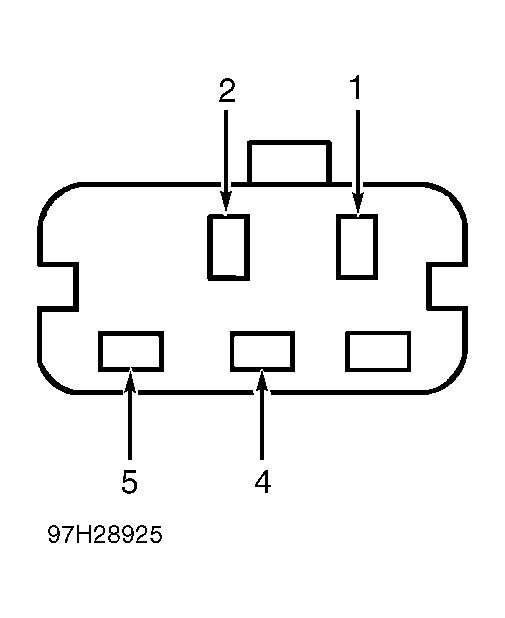 Courtesy of FORD MOTOR CO.