Test C: No Modules On ISO 9141 Respond
- Check Scan Tool Cable
Inspect terminals on scan tool's data cable. Repair cable terminals as necessary. If cable terminals are okay, go to next step.
- Check Data Link Connector
Inspect Data Link Connector (DLC) terminals. Repair DLC terminals as necessary. If all terminals are okay, go to next step.
- Check Circuit No. 70 For Open
Turn ignition off. Disconnect Generic Electronic Module (GEM) harness connector. Measure resistance of circuit No. 70 (Light Blue/White wire) between DLC terminal No. 7 and GEM harness connector terminal No. 10 (Light Blue/White wire). See Figure
and Figure
. If resistance is less than 5 ohms, go to next step. If resistance is greater than 5 ohms, repair open Light Blue/White wire between GEM harness connector and DLC.
- Check For Anti-Lock Brakes
Determine if vehicle is equipped with Anti-lock Brake System (ABS). If vehicle is equipped with ABS, go to next step. If vehicle is not equipped with ABS, go to step 7).
- Check ABS Module
Turn ignition off. Disconnect ABS module. Turn ignition switch to RUN position. Perform DATA LINK DIAGNOSTICS. If scan tool displays CKT70=00000001F, go to next step. If scan tool does not display CKT70=00000001F, check ABS control module harness connector for damage and repair as necessary. If harness connector is okay, replace ABS control module. Perform DATA LINK DIAGNOSTICS
.
- Check Harness No. 14290
Turn ignition off. Disconnect harness connector C263 (C221 on 3.0L 2V). See Figure
and Figure
. Turn ignition switch to RUN position. Perform DATA LINK DIAGNOSTICS. If scan tool displays CKT70=00000001F, go to next step. If scan tool does not display CKT70=00000001F, repair circuit 70 (Light Blue/White wire) in harness No. 14290. See Fig 1
. Repeat DATA LINK DIAGNOSTICS
to confirm repair.
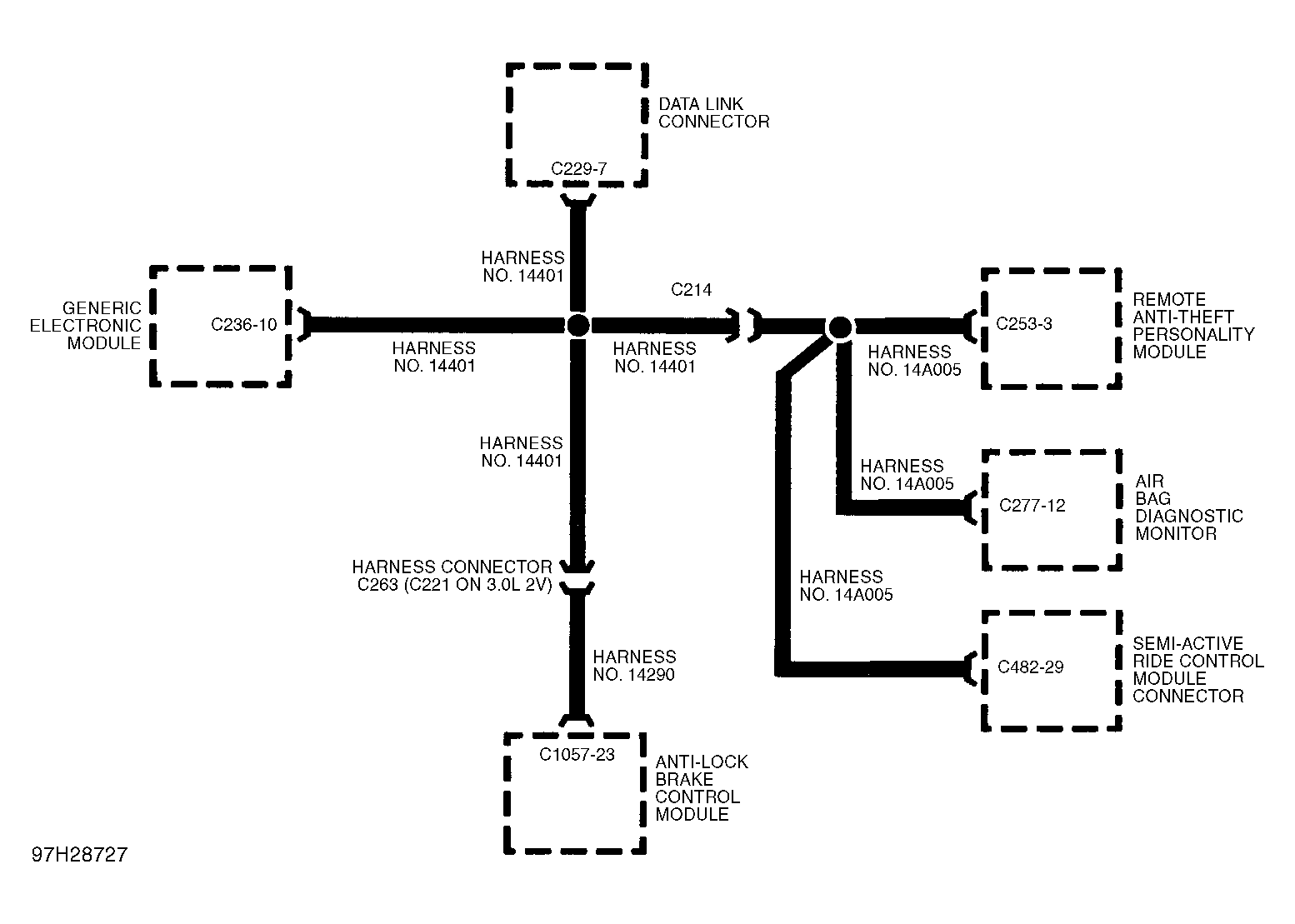 Courtesy of FORD MOTOR CO.
- Check GEM
Turn ignition off. Reconnect ABS control module. Disconnect GEM. Turn ignition switch to RUN position. Perform DATA LINK DIAGNOSTICS
. If scan tool displays CKT70=00000001F, go to next step. If scan tool does not display CKT70=00000001F, check GEM harness connector for damage and repair as necessary. If harness connector is okay, replace GEM. Repeat DATA LINK DIAGNOSTICS
to confirm repair.
- Check Harness No. 14A005
Turn ignition off. Disconnect harness connector C214 (Black 38-terminal harness connector behind left corner of instrument panel). Turn ignition switch to RUN position. Perform DATA LINK DIAGNOSTICS
. If scan tool does not display CKT70=00000001F, go to next step. If scan tool displays CKT70=00000001F, repair circuit 70 (Light Blue/White wire) in harness No. 14401. Restore all electrical connections and repeat DATA LINK DIAGNOSTICS
to confirm repair.
- Check Air Bag Diagnostic Monitor
Turn ignition off. Reconnect GEM connector C236. See Figure
. Disconnect harness connector C214 (Black 38-terminal harness connector behind left corner of instrument panel). Disconnect negative battery cable. Disconnect positive battery cable and wait one minute to allow air bag back-up power to discharge. Disconnect air bag diagnostic monitor harness connector C277 (Black connector located behind integrated control panel). Reconnect positive and negative battery cables. Turn ignition switch to RUN position. Perform DATA LINK DIAGNOSTICS
. If scan tool displays CKT70=00000001F, go to next step. If scan tool does not display CKT70=00000001F, check air bag diagnostic monitor harness connector C277 for damage and repair as necessary. If harness connector is okay, replace air bag diagnostic monitor. Repeat DATA LINK DIAGNOSTICS
to confirm repair.
- Check For RAP Module
Determine if vehicle is equipped with Remote Anti-theft Personality (RAP) module. RAP module is located behind integrated control panel. If vehicle is equipped with RAP module, go to next step. If vehicle is not equipped RAP module, go to step 12).
- Check RAP Module
Turn ignition off. Disconnect harness connector C253 (26-terminal connector) from RAP module. Turn ignition switch to RUN position. Perform DATA LINK DIAGNOSTICS
. If scan tool displays CKT70=00000001F, go to next step. If scan tool does not display CKT70=00000001F, check RAP module harness connector C253 for damage and repair as necessary. If connector C253 is okay, replace RAP module. Repeat DATA LINK DIAGNOSTICS
to confirm repair.
- Check For SARC Module
Determine if vehicle is equipped with Semi-Active Ride Control (SARC) module. SARC module is located behind rear seat on right side of luggage compartment. If vehicle is equipped with SARC module, go to next step. If vehicle is not equipped SARC module, repair circuit No. 70 (Light Blue/White wire) in harness No. 14A005. Repeat DATA LINK DIAGNOSTICS
to confirm repair.
- Check SARC Module
Turn ignition off. Disconnect harness connector C451 (16-terminal connector containing Light Blue/White wire) from SARC module. Turn ignition switch to RUN position. Perform DATA LINK DIAGNOSTICS
. If scan tool displays CKT70=00000001F, repair circuit No. 70 (Light Blue/White wire) in harness No. 14A005. Repeat DATA LINK DIAGNOSTICS
to confirm repair. If scan tool does not display CKT70=00000001F, check SARC module harness connector C451 for damage and repair as necessary. If harness connector C482 is okay, replace SARC module. Repeat DATA LINK DIAGNOSTICS
to confirm repair.