Test D: Instrument Cluster Does Not Respond To Scan Tool
- Turn ignition switch to LOCK position. Disconnect 12-pin instrument cluster harness connector C250. It may be necessary to remove instrument cluster for access to electrical connector. See REMOVAL & INSTALLATION
. Inspect connector for loose, damaged or corroded terminals. If connector is damaged, repair as necessary. If connector is not damaged, go to next step.
- Reconnect instrument cluster harness connector C250 and NGS tester. Turn ignition switch to RUN position. Perform data link diagnostic procedure. See DATA LINK DIAGNOSTIC TEST
under SELF-DIAGNOSTIC SYSTEM. If ICM: NO RESPONSE ON CKT 914 (BUS +) was retrieved, go to next step. If ICM: NO RESPONSE ON CKT 915 (BUS +) was not retrieved, go to step 4
.
- Turn ignition switch to LOCK position. Disconnect NGS tester. Disconnect instrument cluster harness connector C250. Measure resistance in Tan/Orange wire between instrument cluster harness connector C250 terminal No. 1 and DLC terminal No. 2. See Figure
and Fig 1
. If resistance is more than 5 ohms, repair open in Tan/Orange wire between instrument cluster and DLC. See DATA LINK CONNECTORS article in WIRING DIAGRAMS. If resistance is 5 ohms or less, replace instrument cluster.
- Turn ignition switch to LOCK position. Disconnect NGS tester. Measure resistance in Pink/Light Blue wire between instrument cluster harness connector C250 terminal No. 2 and DLC terminal No. 10. See Figure
and Fig 1
. If resistance is more than 5 ohms, repair open in Pink/Light Blue wire between instrument cluster and DLC. See DATA LINK CONNECTORS article in WIRING DIAGRAMS. If resistance is 5 ohms or less, replace instrument cluster.
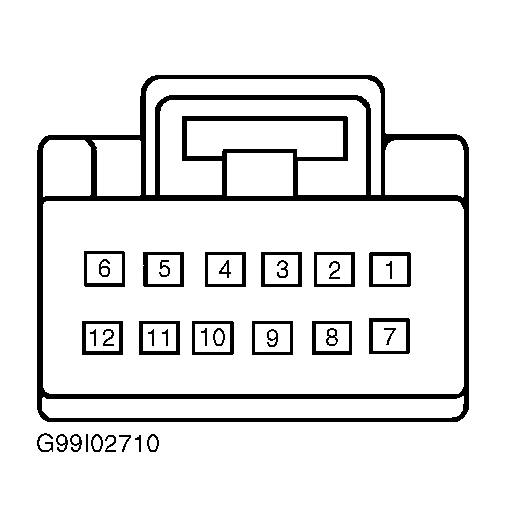 Courtesy of FORD MOTOR CO.