Inspection and Verification
- Verify the customer concern by operating the system.
- Visually inspect for obvious signs of mechanical or electrical damage.
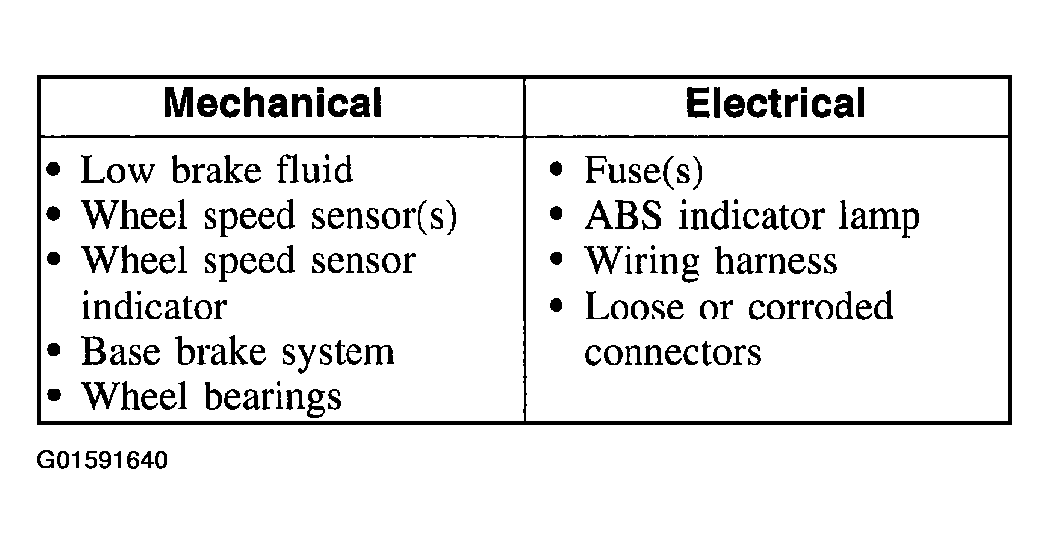 Courtesy of FORD MOTOR CO.
- If an obvious cause for an observed or reported concern is found, correct the cause (if possible) before proceeding to the next step.
- If a concern remains after the inspection, connect the scan tool to the data link connector (DLC) located beneath the instrument panel and select the vehicle to be tested from the scan tool menu. If the scan tool does not communicate with the vehicle:
- check that the program card is correctly installed.
- check the connections to the vehicle.
- check the ignition switch position.
- If the scan tool still does not communicate with the vehicle, refer to the scan tool manual.
- Carry out the DATA LINK DIAGNOSTIC TEST. If the scan tool responds with:
- CKT914, CKT915 or CKT70 = ALL ECUS NO RESP/NOT EQUIP. REFER to MODULE COMMUNICATIONS NETWORK
.
- NO RESP/NOT EQUIP for anti-lock brake control module, GO to PINPOINT TEST A .
- SYSTEM PASSED, retrieve and record the continuous diagnostic trouble codes (DTCs), erase the continuous DTCs and carry out self-test diagnostics for the anti-lock brake control module.
- If the DTCs retrieved are related to the concern, go to anti-lock brake control module Diagnostic Trouble Code (DTC) Index to continue diagnostics.
- If no DTCs related to the concern are retrieved, GO to SYMPTOM CHART to continue diagnostics.