Accessory Protocol Interface Module (APIM)
Accessory Protocol Interface Module (APIM)
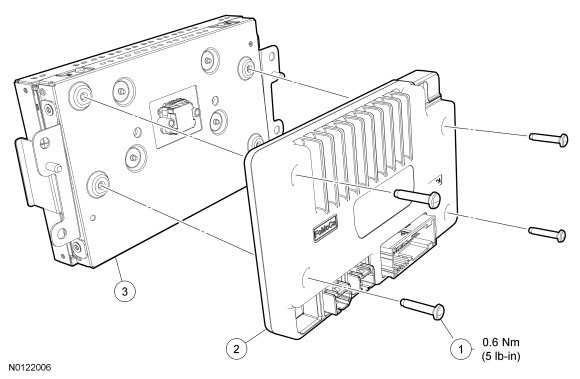
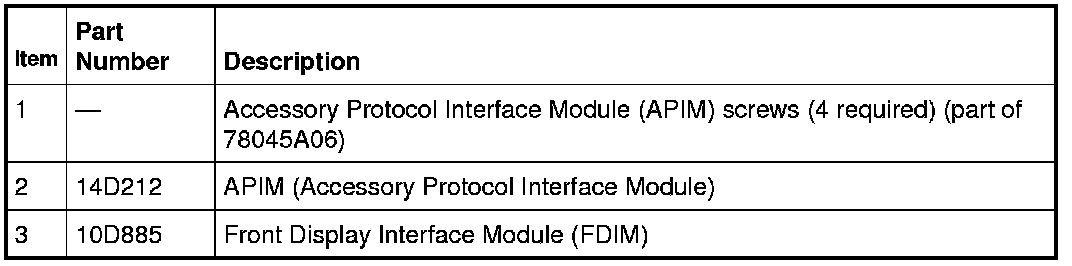
Removal and Installation
1. Remove the Front Display Interface Module (FDIM) refer to Front Display Interface Module (FDIM) Front Display Interface Module (FDIM).
- Disconnect the electrical connectors.
2. Remove the 4 screws and remove the Accessory Protocol Interface Module (APIM) from the FDIM (Front Display Interface Module).
- To install, tighten to 0.6 Nm (5 lb-in).
3. To install, reverse the removal procedure.
- If a new APIM (Accessory Protocol Interface Module) is being installed, program the APIM (Accessory Protocol Interface Module) to the correct software level. For additional information, refer to Accessory Protocol Interface Module (APIM) Programming- Module Replacement, 8-Inch (203 mm) Touchscreen Accessory Protocol Interface Module (APIM) Programming - Module Replacement, 8-Inch (203 mm) Touchscreen.