Pinpoint Test
- CHECK THE Remote Function Actuator (RFA) MODULE VOLTAGE SUPPLY CIRCUITS FOR AN OPEN
- Ignition OFF.
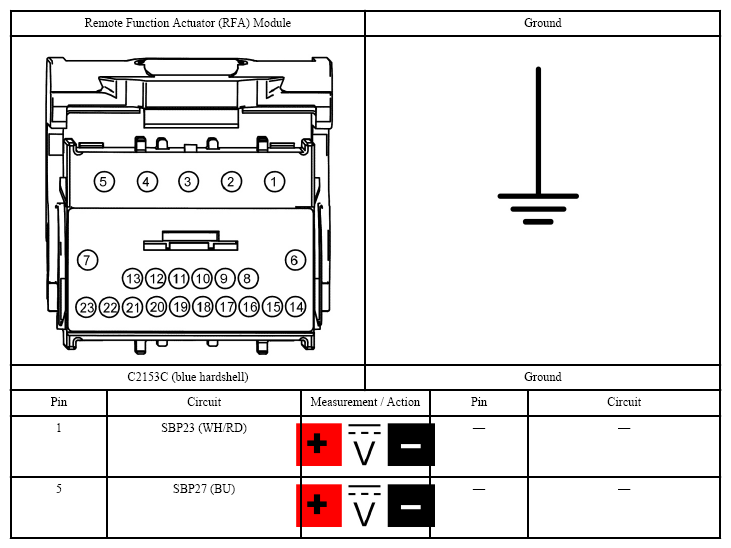
- Disconnect: Remote Function Actuator (RFA) module C2153C (Blue hardshell).
- Ignition ON.
- Measure:
 Courtesy of FORD MOTOR CO.
- Is the voltage greater than 11 volts?
- Yes:
GO to 2
on page 2.
- No:
VERIFY the Body Control Module (BCM) fuses 23 (15A) and 27 (20A) are OK. If OK, REPAIR the circuit in question. If not OK, REFER to the SYSTEM WIRING DIAGRAMS
to identify the possible causes of the circuit short.
- CHECK THE Remote Function Actuator (RFA) MODULE GROUND CIRCUIT FOR AN OPEN
- Ignition OFF.
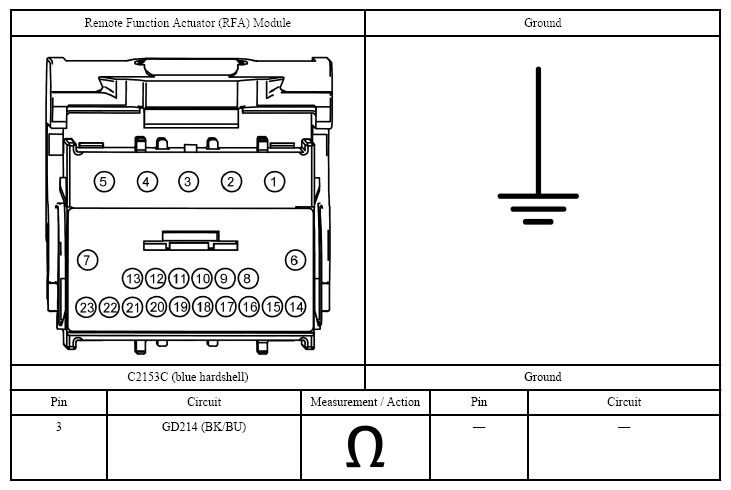
- Measure:
 Courtesy of FORD MOTOR CO.
- Is the resistance less than 3 ohms?
- Yes:
GO to 3
on page 3.
- No:
REPAIR the circuit in question.
- CHECK THE Medium Speed Controller Area Network (MS-CAN) CIRCUITS BETWEEN THE Remote Function Actuator (RFA) MODULE AND THE Data Link Connector (DLC) FOR AN OPEN
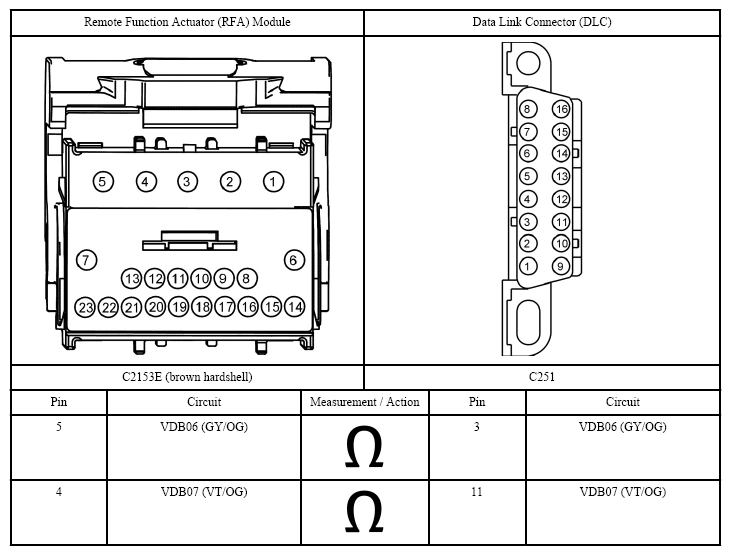
- Disconnect: Remote Function Actuator (RFA) module C2153E (Brown hardshell).
- Measure:
 Courtesy of FORD MOTOR CO.
- Are the resistances less than 3 ohms?
- Yes:
GO to 4
on page 4.
- No:
REPAIR the circuit in question.
- CHECK FOR CORRECT Remote Function Actuator (RFA) MODULE OPERATION
- Ignition OFF.
- Disconnect and inspect the Remote Function Actuator (RFA) module connectors.
- Repair:
- corrosion (replace connector or terminals - clean module pins)
- damaged or bent pins - replace terminals/pins
- pushed-out pins - replace pins as necessary
- Reconnect the Remote Function Actuator (RFA) module connectors. Make sure they seat and latch correctly.
- Operate the system and verify the concern is still present.
- Is the concern still present?
- Yes:
CHECK On-Line Automotive Service Information System (OASIS) for any applicable Technical Service Bulletins (TSBs). If a Technical Service Bulletin (TSB) exists for this concern, discontinue this test and follow Technical Service Bulletin (TSB) instructions. If no Technical Service Bulletins (TSBs) address this concern, INSTALL a new Remote Function Actuator (RFA) module. REFER to REMOTE FUNCTION ACTUATOR (RFA) MODULE .
- No:
The system is operating correctly at this time. Concern may have been caused by a loose or corroded connector.