Checking Fuel Pump Operation Using Scan Tool (GS300, GS400, SC300 & SC400)
- Connect scan tool to Data Link Connector (DLC) No. 3, located under left side of instrument panel. Turn ignition on. DO NOT start engine.
- Turn scan tool on. Select ACTIVE TEST mode on scan tool. Using scan tool manufacturer's instructions, activate fuel pump. On GS300 and SC300, listen for fuel pump operating sound and check that screw at center of fuel pressure pulsation damper moves upward due to the fuel pressure. See Fig 1. Fuel pulsation damper is located at firewall end of fuel rail. On GS400 and SC400, listen for fuel pump operating sound and feel for fuel pressure in fuel inlet hose to rear of the fuel rails.
- On all models, turn ignition off. Remove scan tool. If fuel pump operates, check fuel pressure. See FUEL PRESSURE . If fuel pump does not operate, check for defective fusible links/fuses. See appropriate wiring diagram in WIRING DIAGRAMS article. If fusible links/fuses are okay, go to next step.
- Check for defective fuel pump. See CHECKING FUEL PUMP OPERATION BY APPLYING BATTERY VOLTAGE TO FUEL PUMP . Replace fuel pump as necessary and retest. If fuel pump operates, check fuel pump control circuit. See FUEL DELIVERY under FUEL SYSTEM in appropriate SYSTEM & COMPONENT TESTING article.
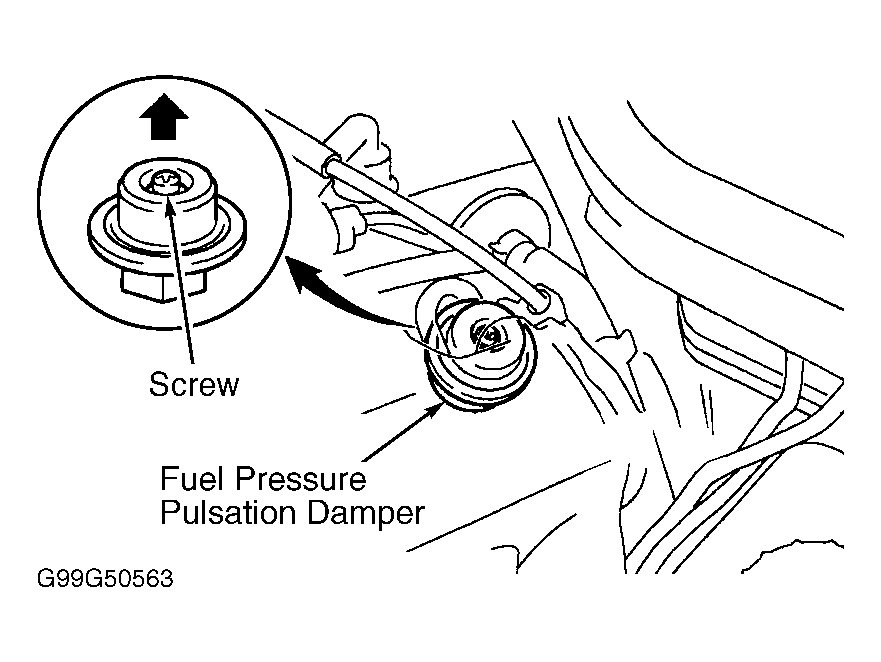 Courtesy of © TOYOTA, LICENSE AGREEMENT TMS1002