Radio Receiver: Removal
- REMOVE SHIFT LEVER KNOB SUB-ASSEMBLY (for Automatic Transmission)
(See
REMOVAL
)
- REMOVE SHIFT LEVER KNOB SUB-ASSEMBLY (for Manual Transmission)
(See
REMOVAL
)
- REMOVE UPPER NO. 1 CONSOLE PANEL GARNISH (for Automatic Transmission)
(See
REMOVAL
)
- REMOVE UPPER NO. 2 CONSOLE PANEL GARNISH (for Automatic Transmission)
(See
REMOVAL
)
- REMOVE CONSOLE PANEL SUB-ASSEMBLY (for Automatic Transmission)
(See
REMOVAL
)
- REMOVE REAR CONSOLE PANEL SUB-ASSEMBLY (for Manual Transmission)
(See
REMOVAL
)
- REMOVE FRONT CONSOLE PANEL SUB-ASSEMBLY (for Manual Transmission)
(See
REMOVAL
)
- REMOVE FRONT ASH RECEPTACLE SUB-ASSEMBLY
(See
REMOVAL
)
- REMOVE CONSOLE BOX REGISTER ASSEMBLY
(See
REMOVAL
)
- REMOVE CONSOLE BOX
(See
REMOVAL
)
- REMOVE NO. 3 INSTRUMENT PANEL REGISTER ASSEMBLY
(See
REMOVAL
)
- REMOVE CENTER LOWER INSTRUMENT CLUSTER FINISH PANEL
(See
REMOVAL
)
- REMOVE INTEGRATION CONTROL PANEL WITH RADIO RECEIVER ASSEMBLY (w/o Navigation System)
- Remove the 4 bolts.
- Pull the integration control panel w/ radio receiver assembly toward the rear of the vehicle.
- Disconnect each connector and remove the panel.
 Courtesy of © TOYOTA, LICENSE AGREEMENT TMS1002
- REMOVE NO. 1 RADIO BRACKET (w/o Navigation System)
- Remove the 6 bolts and radio No. 1 bracket.
 Courtesy of © TOYOTA, LICENSE AGREEMENT TMS1002
- REMOVE NO. 2 RADIO BRACKET (w/o Navigation System)
- Remove the 6 bolts and radio No. 2 bracket.
 Courtesy of © TOYOTA, LICENSE AGREEMENT TMS1002
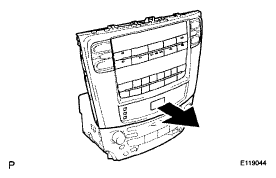
- REMOVE RADIO RECEIVER ASSEMBLY (w/o Navigation System)
- Slide the integration control panel in the direction shown by the arrow to remove the radio receiver assembly.
 Courtesy of © TOYOTA, LICENSE AGREEMENT TMS1002
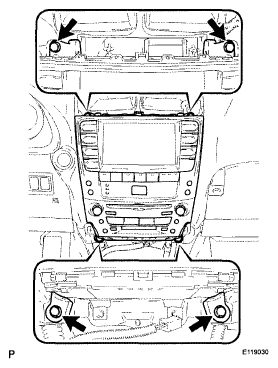
- REMOVE MULTI-DISPLAY WITH RADIO RECEIVER ASSEMBLY (w/ Navigation System)
- Remove the 4 bolts.
- Pull the multi-display w/ radio receiver assembly toward the rear of the vehicle.
- Disconnect each connector and remove the multi-display.
 Courtesy of © TOYOTA, LICENSE AGREEMENT TMS1002
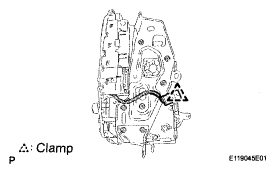
- REMOVE NO. 1 RADIO BRACKET (w/ Navigation System)
- Disengage the connector clamp.
 Courtesy of © TOYOTA, LICENSE AGREEMENT TMS1002
- Remove the 7 bolts and radio No. 1 bracket.
 Courtesy of © TOYOTA, LICENSE AGREEMENT TMS1002
- REMOVE NO. 2 RADIO BRACKET (w/ Navigation System)
- Remove the 7 bolts and radio No. 2 bracket.
 Courtesy of © TOYOTA, LICENSE AGREEMENT TMS1002
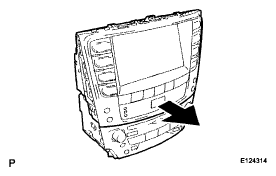
- REMOVE RADIO RECEIVER ASSEMBLY (w/ Navigation System)
- Slide the multi-display in the direction shown by the arrow to remove the radio receiver assembly.
 Courtesy of © TOYOTA, LICENSE AGREEMENT TMS1002