Front Controls Interface Module (FCIM)
Front Controls Interface Module (FCIM)
Edge
MKX
Removal and Installation
All vehicles
1. Remove the LH and RH floor console upper finish moulding.
Edge
2. Place the transmission selector lever in neutral.
3. NOTE: The floor console selector lever panel does not need to be removed.
Remove the 4 screws, detach the 2 clips and position the floor console selector lever trim panel back.
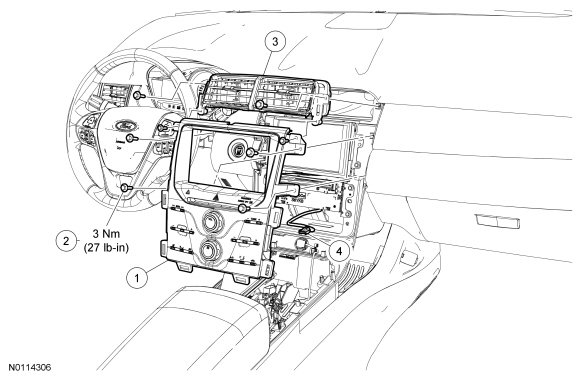
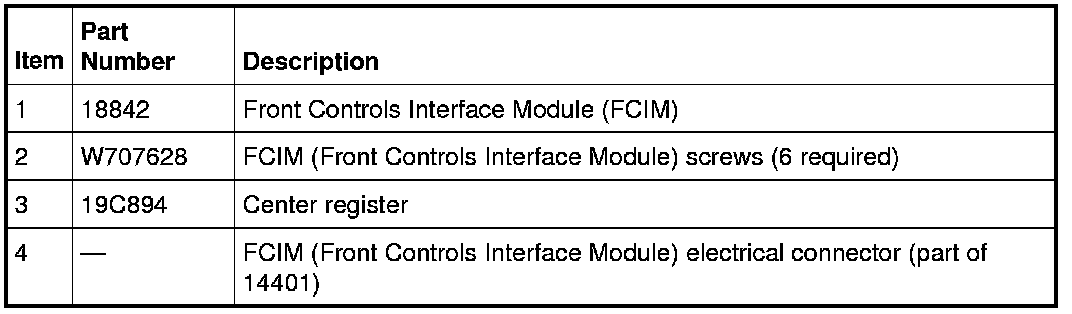
4. Remove the 6 Front Controls Interface Module (FCIM) screws and remove the FCIM (Front Controls Interface Module).
- Disconnect the electrical connector.
MKX
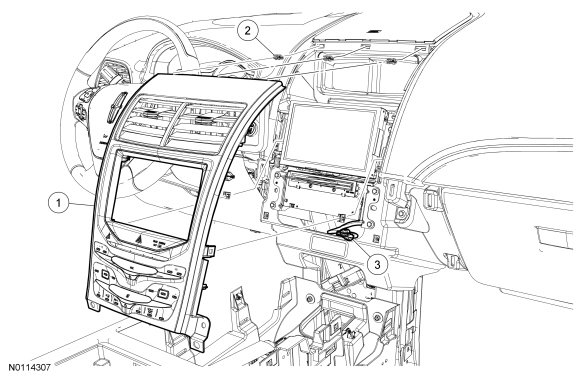
5. Remove the two screws at the lower LH and RH corners of the of the FCIM (Front Controls Interface Module).
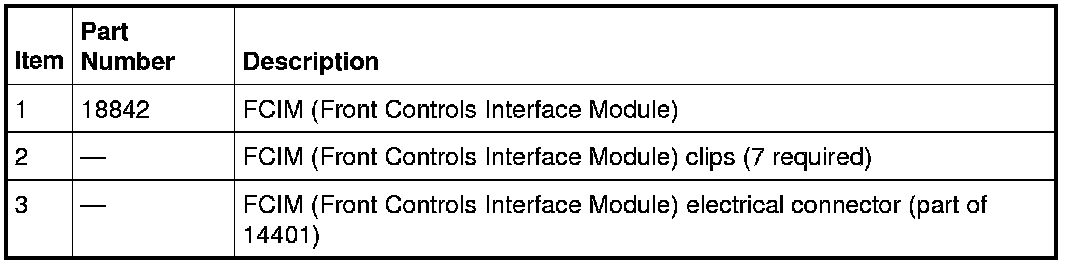
6. Pull back on the FCIM (Front Controls Interface Module) starting at the bottom and working to the top to release the clips. Remove the FCIM (Front Controls Interface Module).
- Disconnect the electrical connector.
All vehicles
7. To install, reverse the removal procedure.