Front Controls Interface Module (FCIM)
Front Controls Interface Module (FCIM)
NOTE: Vehicle with navigation shown, others similar.
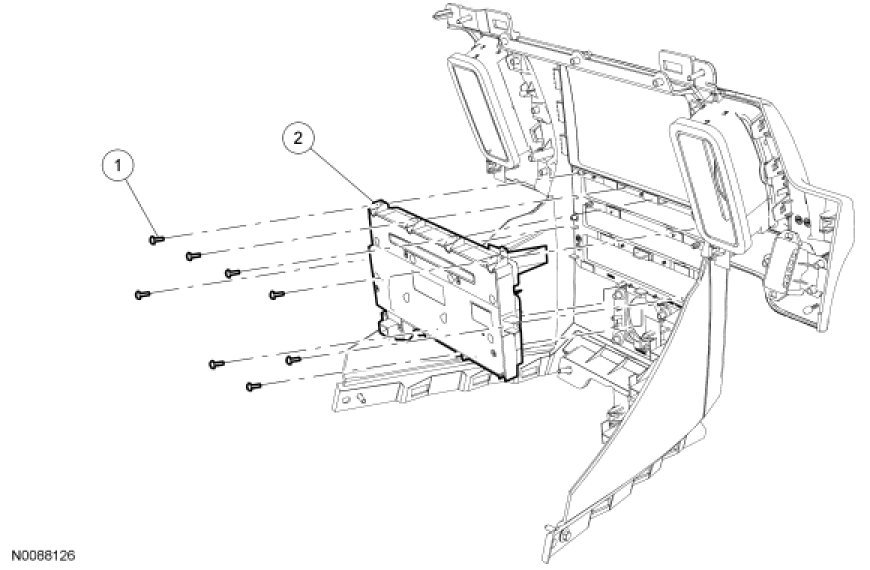

Removal
1. Remove the instrument panel center finish panel. For additional information, refer to Instrument Panel and Console Instrument Panel Finish Panel.
2. Remove the 17 screws (vehicles without navigation) or 8 screws (vehicles with navigation), and remove the Front Controls Interface Module (FCIM).
Installation
1. Align the FCIM to the instrument panel center finish panel so there is a consistent gap at the top of the FCIM.
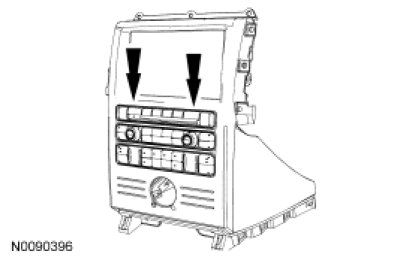
2. NOTICE: Lightly hand-tighten the screws. Do not use power tools.
Install the 17 screws (vehicles without navigation) or 8 screws (vehicles with navigation).
- Adjust the FCIM, if necessary, by loosening the top screws, then re-tightening.
3. Install the instrument panel center finish panel. For additional information, refer to Instrument Panel and Console Instrument Panel Finish Panel.