Multi Information Display Removal/Installation
MULTI INFORMATION DISPLAY REMOVAL/INSTALLATION
CAUTION:
- When replacing the multi information display, the configuration procedure must be performed before removing the multi information display. The multi information display will not operate normally if it is replaced without performing the configuration procedure.
1. Perform the multi information display configuration when replacing it. Information Display/Multi Information Display Configuration
2. Disconnect the negative battery cable. Removal and Replacement Removal and Replacement Removal and Replacement
3. Remove the following parts:
a. Upper column cover Service and Repair
b. Instrument cluster Removal and Replacement
c. Center panel Center Panel Removal/Installation
d. Audio unit Audio Unit Removal/Installation
e. Center cover Center Cover Removal/Installation
f. Dashboard upper panel Dashboard Upper Panel Removal/Installation
g. GPS antenna (with car-navigation system) GPS Antenna Removal/Installation
h. Hole cover Hole Cover Removal/Installation
4. Remove the wiring harness clip.
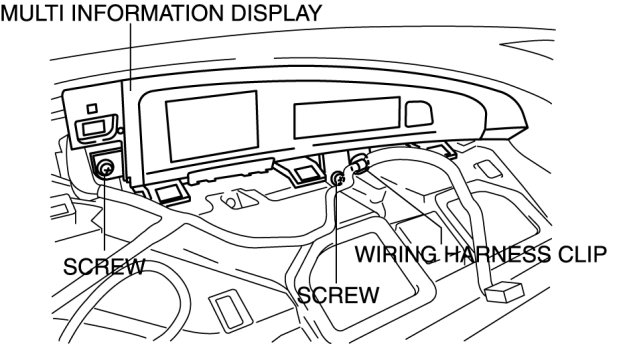
5. Remove the screws.
6. Pull the multi information display outward and remove it
7. Disconnect the connector and clips.
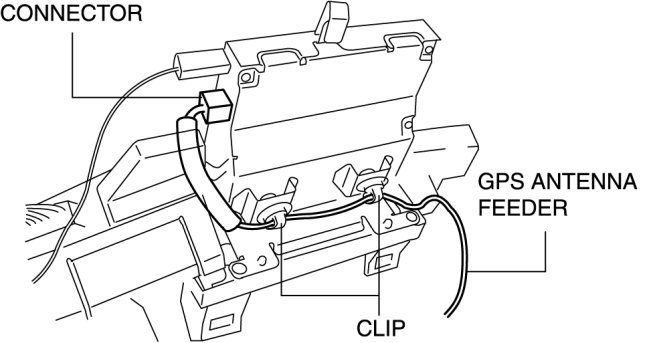
8. Remove the GPS antenna feeder.
9. Disconnect the connector A and B.
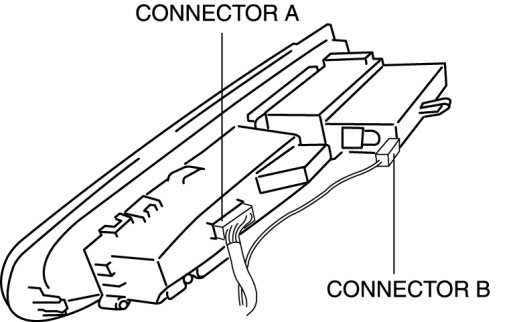
10. Remove the multi information display.