Set/Resume/Cancel Switch Test
- Disable air bag system. See appropriate AIR BAG RESTRAINT SYSTEMS article in the ACCESSORIES/SAFETY EQUIPMENT section. Remove instrument panel lower cover. Disconnect combination switch Blue 20-pin connector located under left side of instrument panel. Use DVOM to check continuity between 20-pin connector terminals. Go to next step.
- With SET button in ON position, continuity should exist between terminals No. 16 (Light Green/Blue wire) and No. 13 (Green/Red wire). With RESUME button in ON position, continuity should exist between terminals No. 4 (Light Green/Black wire) and No. 16 (Light Green/Blue wire). With CANCEL button selected, continuity should exist between terminals No. 4, 13 and 16. See Fig 1
. If continuity does not exist, go to next step. If continuity exists, switch is okay.
- Remove upper and lower steering column covers. Disconnect combination switch 4-pin connector from cable reel. Use DVOM to check for continuity between 20-pin connector terminal No. 4 and 4-pin connector terminal No. 2 (Light Green/Black wire); 20-pin connector terminal No. 13 and 4-pin connector terminal No. 1 (Green/Red wire); and 20-pin connector terminal No. 16 and 4-pin connector terminal No. 3 (Light Green/Blue wire). See Fig 1
. If continuity exists, go to next step. If continuity does not exist, replace combination switch harness.
- Remove SET/RESUME/CANCEL switch. See SET/RESUME/CANCEL SWITCH
under REMOVAL & INSTALLATION. Use DVOM to check for continuity between switch terminals. With SET button in ON position, continuity should exist between terminals No. 1 and No. 3. With RESUME button in ON position, continuity should exist between terminals No. 1 and No. 2. With CANCEL button selected, continuity should exist between terminals No. 1, 2 and 3. See Fig 1
. If continuity does not exist, replace SET/RESUME/CANCEL switch. See SET/RESUME/CANCEL SWITCH
under REMOVAL & INSTALLATION. If continuity exists, replace cable reel.
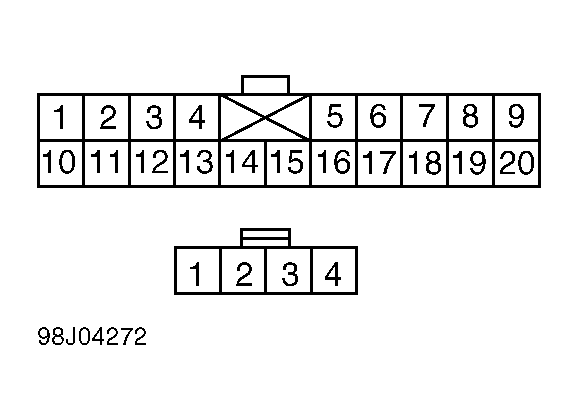 Courtesy of AMERICAN HONDA MOTOR CO., INC.