Wiper/Washer Switch Test/Replacement
- Remove the steering column covers (see STEERING COLUMN COVER REMOVAL/INSTALLATION
)
- Disconnect the dashboard wire harness 8P connector (A) from the wiper/washer switch (B)
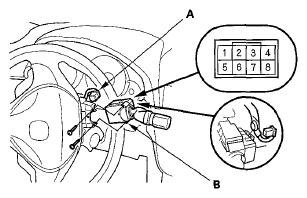 Courtesy of AMERICAN HONDA MOTOR CO., INC.
- Remove the two screws, then slide out the wiper/washer switch
- Inspect the connector terminals to be sure they are all making good contact
- If the terminals are bent, loose or corroded, repair them as necessary, and recheck the system
- If the terminals look OK, go to step 5
- Check for continuity between the terminals in each switch position according to the table
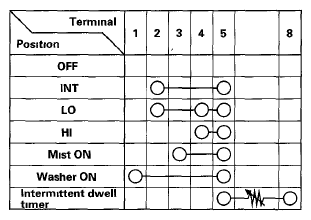 Courtesy of AMERICAN HONDA MOTOR CO., INC.
- If the continuity is not as specified, replace the switch
- Install the switch in the reverse order of removal