Navigation Communication Line Circuit Troubleshooting (With Navigation)
Navigation Communication Line Circuit Troubleshooting
1. Turn the ignition switch to ON (II), or press the engine start/stop button to select the ON mode.
2. Operate the climate control system in several modes.
Is the climate control system OK?
YES -
Go to step 3.
NO -
Do the Self-Diagnostic Function with the HDS or the climate control unit.�
3. Go into the System Diagnostic Mode Navigation System Diagnostic Mode, and select the Self-Diagnosis Mode to check the System Link.
Is the A/C or Mic icon red?
YES -
- If A/C icon is red, go to step 4.
- If Mic icon is red, go to "Voice control does not work/respond" in the navigation system Symptom Troubleshooting .�
NO -
Go to step 10.
4. Turn the ignition switch to LOCK (0), or press the engine start/stop button to select the OFF mode.
5. Disconnect audio-navigation unit connector D (20P).
6. Disconnect climate control unit connector C (20P).
7. Check for continuity between the following terminals of climate control unit connector C (20P) and audio-navigation unit connector D (20P).

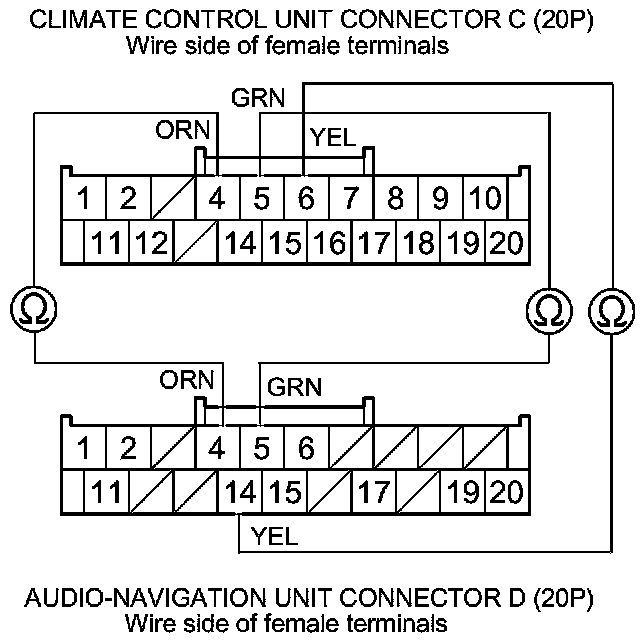
Is there continuity?
YES -
Go to step 8.
NO -
Repair an open in the wire(s) between the climate control unit and the audio-navigation unit.�
8. Check for continuity between body ground and climate control unit connector terminals No. 4,No. 5, and No. 6 individually.
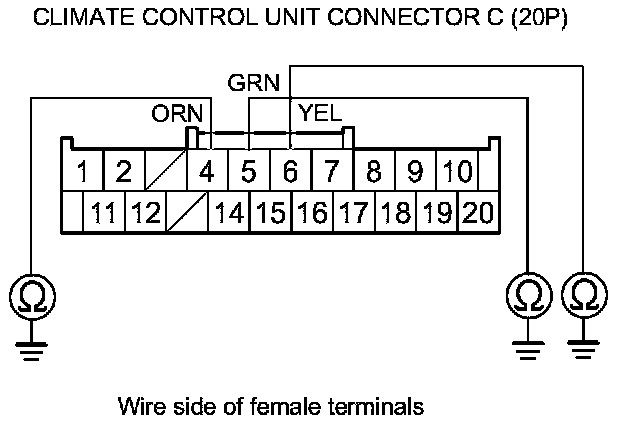
Is there continuity?
YES -
Repair a short to body ground in the wire(s) between the climate control unit and the audio-navigation unit.�
NO -
Go to step 9.
9. Reconnect climate control unit connector C (20P).
10. Connect audio-navigation unit connector D (20P) terminals No. 4 and No. 5 with jumper wire, then connect terminals No. 4 and No. 14 with a jumper wires.
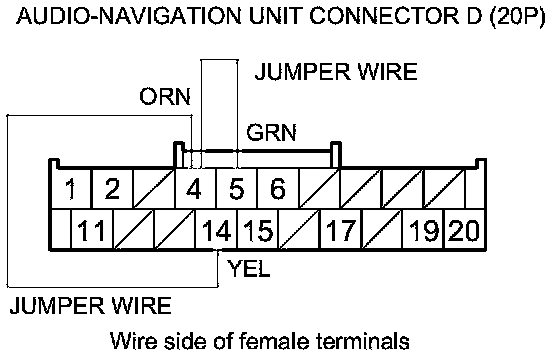
11. Turn the ignition switch to ON (II), or press the engine start/stop button to select the ON mode.
12. Press and hold the AUTO button, then press and hold the FAN ON/OFF button.

Is the HEAT/VENT indicator solid with the remaining icons blinking?
YES -
Do the Unit Check with the Navigation System Diagnostic Mode Navigation System Diagnostic Mode.�
NO -
Substitute a known-good climate control unit, and recheck. If the symptom goes away, replace the original climate control unit Service and Repair.�