Test A: All Power Windows Inoperative
- If door systems diagnostic system check has been performed, go to next step. If door systems diagnostic system check has not been performed, perform DOOR SYSTEMS DIAGNOSTIC SYSTEM CHECK
under SELF-DIAGNOSTIC SYSTEM.
- Attempt to operate power windows. If all power windows are inoperative, go to next step. If any power window operates, inspect for intermittents. See TROUBLE SHOOTING
.
- Disconnect driver's power window switch 8-pin harness connector. Turn ignition switch to OFF position. Connect a test light between ground and driver's power window switch harness connector terminal "H" (Pink wire). See Fig 1
. If test light illuminates, go to next step. If test light does not illuminate, go to step 5
.
- Connect a test light between driver's power window switch harness connector terminals "G" (Black wire) and "H" (Pink wire). If test light does not illuminate, go to step 6
. If test light illuminates, go to step 7
.
- Inspect Pink wire for an open or short to ground between driver's power window switch harness connector terminal "H" and Retained Accessory Power (RAP) relay. RAP relay is located in left front passenger's compartment, taped to body wiring harness. See Figure
. If an open or short to ground is not found, repair RAP system as necessary. See appropriate POWER DISTRIBUTION article. If an open or short to ground is found, repair Pink wire as necessary. After repair, go to step 9
.
- Inspect Black wire for an open between ground and driver's power window switch harness connector terminal "G". See Fig 1
. Ground point is located behind left kick panel. If an open is not found, go to next step. If an open is found, repair Black wire as necessary. After repair, go to step 9
.
- Inspect driver's power window switch harness connector for poor connections. If poor connections are not found, go to next step. If poor connections are found, repair driver's power window switch harness connector as necessary. After repair, go to step 9
.
- Replace driver's power window switch, then go to next step.
- Operate system to verify repair. If system is not operating correctly, repeat test beginning at step 3
.
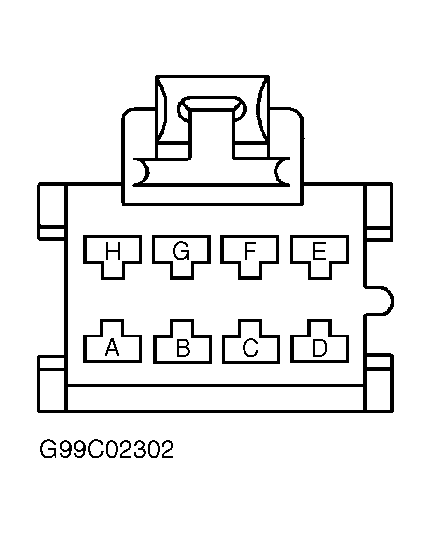 Courtesy of GENERAL MOTORS CORP.