Set The Compass Variance Manually As Follows:
- Using the Variance Settings map, find your geographic location and note the zone number.
 Courtesy of CHRYSLER GROUP, LLC
- Turn the ignition switch to the On position.
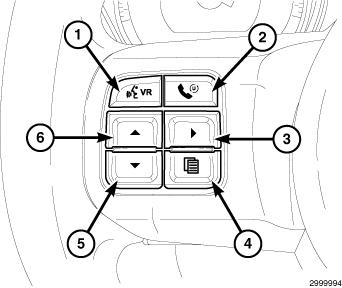
- Press and release the MENU
button (4) until "PERSONAL SETTINGS" is displayed within the (EVIC) Electronic Vehicle Information center display.
- Use the SCROLL
buttons (5 or 6), and scroll through until "COMPASS VARIANCE" is displayed. The "COMPASS VARIANCE" message and the last variance zone number will be displayed.
- Press and release the STEP
button (3) until the zone number for your geographic location appears in the display.
- Press and release the MENU
button to exit.
- Confirm that the correct directions are now indicated by the compass.