Memory Seat Module - Installation
INSTALLATION
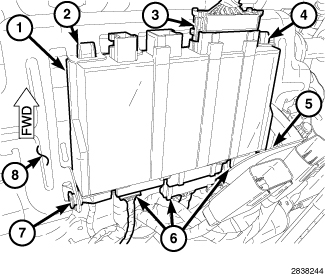
NOTE: Depending on how equipped, more memory seat module electrical connectors may be present than shown in the illustration.
1. Position the Memory Seat Module (MSM) (1) to the driver seat and engage the two front retaining tabs (2 and 4) to the bracket (8).
CAUTION: Properly align the rear Memory Seat Module (MSM) retaining tabs to the bracket, prior to engagement. Failure to follow these instructions may result damage to the MSM rear retaining tabs.
2. Align the two rear MSM retaining tabs (5 and 7) to the bracket and carefully pull downward down on the MSM to engage the tabs. Make sure the retaining tabs are fully engaged to the bracket.
3. Connect the electrical connectors (3 and 6) to the MSM.
4. Install the driver seat Service and Repair
5. Reconnect the negative battery cable.
NOTE: Anytime a new Memory Seat Module (MSM) is replaced, the MSM must be cleared of all learned parameters using a scan tool and the Power Seat System Verification test must be performed.
6. Using a scan tool, select Clear All MSM Learned Parameters, found under the Memory Seat Module, Miscellaneous Functions tab.
7. Perform the Power Seat System Verification test Power Seat System Verification Test.
8. Verify proper memory seat system operation.