Calibrate The Compass Manually As Follows:
 Courtesy of CHRYSLER GROUP, LLC
- Start the engine but leave the vehicle in "PARK".
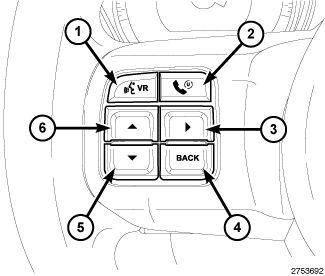
- Press and release the SCROLL
push buttons (5 or 6) until "System Set-up" is displayed and highlighted.
- Press the STEP
push button (3) to open the menu.
- Using the scroll buttons, scroll through until " Calibrate Compass " is displayed and highlighted.
- Momentarily depress and release the STEP
push button to initiate the calibration procedure. The "CAL" symbol will come on solid in the EVIC display next to the compass direction that is displayed.
- Slowly drive the vehicle on a level surface, away from large metal objects and power lines, through one or two complete
circles not exceeding 8 km/h (5 mph). The "CAL" message will disappear from the display to indicate successful compass calibration.
- Confirm that the correct direction is now indicated by the compass.
- Using the scroll button, select " Turn Off Menu " to exit.