Test G: AUTOLOCK Does Not Operate Properly
- Check Transmission Range Sensor
- Close all doors. Sit in driver seat. Turn ignition switch to RUN position. If doors do not lock, go to next step. If doors lock, repair White/Pink wire between DDM connector C518 terminal No. 10 (White/Pink wire) and transmission range sensor and retest system operation.
- Test Autolocks
- Close all doors. Sit in driver seat. Set transmission lever to Reverse or Drive. If doors lock, go to step 8). If doors do not lock, turn autolock function on. See AUTOLOCK
under PROGRAMMING. If doors still do not lock, go to next step.
- Test Door Ajar Circuits
- Close all doors. Turn all lights off. Wait one minute. If courtesy lights go out, go to next step. If courtesy lights remain on, repair appropriate lighting circuitry. See appropriate wiring diagram in ILLUMINATION/INTERIOR LIGHTS article.
- Check Door Ajar Input To Driver Door Module
- Using NGS tester, monitor DDM PID D_DR_DD with all doors closed. If DDM PID D_DR_DD indicates AJAR, go to next step. If DDM PID D_DR_DD does not indicate AJAR, go to step 6).
- Check Lighting Control Module
- Disconnect Lighting Control Module (LCM) 22-pin connector C2026 (located behind left side of instrument panel). With all doors closed, monitor DDM PID D_DR_DD. If DDM PID D_DR_DD indicates AJAR, repair short to ground in Black/Yellow wire and retest system operation. If DDM PID D_DR_DD does not indicate AJAR, replace lighting control module and retest system operation.
- Check Seat Occupied Switch Circuit
- With driver seat occupied, monitor DDM PID D_SEAT. If DDM PID D_SEAT indicates OCCUPD, go to next step. If DDM PID D_SEAT does not indicate OCCUPD, repair for open in White wire and retest system operation.
- Check Park/Neutral Circuit
- Set transmission selector lever to Park or Neutral. Monitor DDM PID PK/N_SW. If DDM PID PK/N_SW indicates P/N, check for stuck transmission range sensor. Repair as necessary and retest system operation. If DDM PID PK/N_SW does not indicate P/N, go to step 11).
- Check Door Locks
- Sit in driver seat. Open and close all doors. If any door does not lock after it is closed, go to next step. If each door locks after it is closed, go to step 10).
- Check Courtesy Lights
- Open door(s) which did not trigger autolock function. Observe courtesy lights. If courtesy lights do not operate when door is opened, repair appropriate lighting circuitry. See appropriate wiring diagram in ILLUMINATION/INTERIOR LIGHTS article. If courtesy lights operate when door is opened, go to next step.
- Check Seat Occupied Switch
- Remove any weight from driver seat. Open and close any door. If doors do not lock, system is operating properly at this time. If doors lock, check White wire for short to ground between driver seat switch and DDM 12-pin connector C518. If wire is okay, replace driver seat switch and retest system.
- Check Door Ajar Input To Lighting Control Module
- Using NGS tester, monitor LCM PID D_DR_LC while opening and closing driver door. If LCM PID D_DR_LC does not indicate AJAR when door is opened, go to next step. If LCM PID D_DR_LC indicates AJAR when door is opened, repair Black/Yellow wire and retest system operation.
- Check Dark Blue Wire For Open
- Disconnect Lighting Control Module (LCM) 22-pin connector C2026 located behind left side of instrument panel. Open driver door. Using an ohmmeter, check resistance between ground and LCM 22-pin connector C2026, terminal No. 11 (Dark Blue wire). See Fig 1
. If resistance is less than 5 ohms, go to next step. If resistance is 5 ohms or more, repair open in Dark Blue wire and retest system operation.
- Check Black/Yellow Wire
- Reconnect LCM 22-pin connector C2026. Open driver door. If instrument panel door ajar light illuminate, replace driver door module and retest system operation. If instrument panel door ajar light does not illuminate, repair Black/Yellow wire and retest system operation.
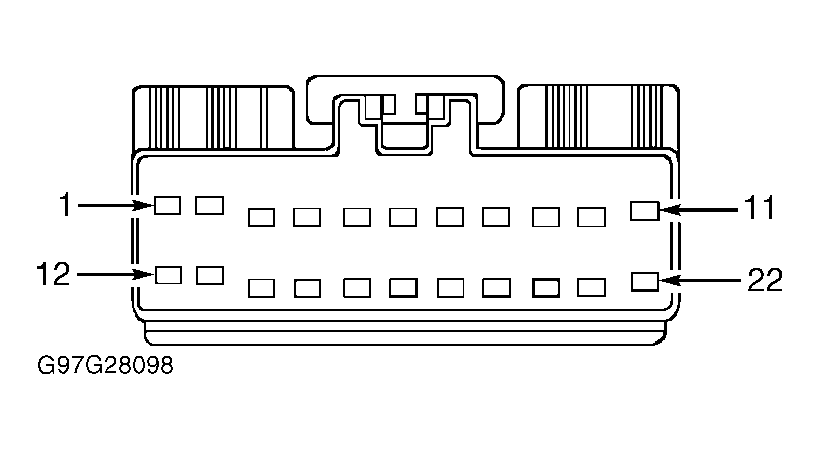 Courtesy of FORD MOTOR CO.