Procedures
CKP Pattern Clear/CKP Pattern Learn Procedure
Procedure
1. HDS DLC - Connection
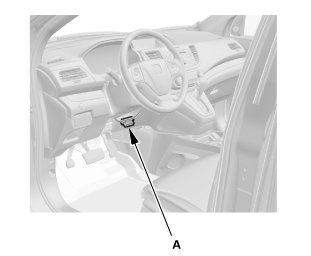
1. Connect the HDS to the data link connector (DLC) (A) located under the driver's side of the dashboard.
2. Turn the ignition switch to ON (II).
3. Make sure the HDS communicates with the vehicle. If it does not communicate, go to the DLC circuit troubleshooting.
2. CKP Pattern Clear/CKP Pattern Learn
1. Select CRANK PATTERN in the ADJUSTMENT MENU with the HDS.
2. Select CRANK PATTERN CLEAR, and clear the CKP pattern.
3. Select CRANK PATTERN LEARNING with the HDS, and follow the screen prompts.
4. After learning, turn the ignition switch to LOCK (0).
5. Disconnect the HDS from the DLC.