October 30: LEMON manuals on a temporary server, it is slow and having issues, download the manuals you need! Later in November we will switch back to the fast server.
VSA Modulator-Control Unit Removal and Installation: Installation
- Install the VSA modulator-control unit (A) onto the bracket (B).
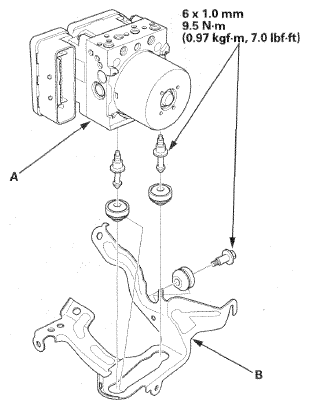 Courtesy of AMERICAN HONDA MOTOR CO., INC.
- Install the VSA modulator-control unit (A) with the bracket (B) to the body.
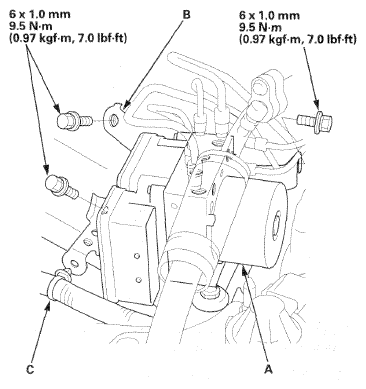 Courtesy of AMERICAN HONDA MOTOR CO., INC.
- Install the wire harness clip (C) to the bracket.
- Align the connecting surface of the VSA modulator-control unit 32P connector (A) to the VSA modulator-control unit.
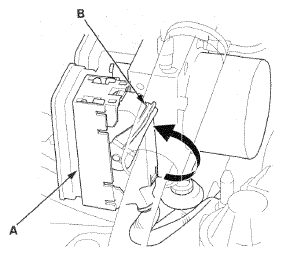 Courtesy of AMERICAN HONDA MOTOR CO., INC.
- Pull up the lever (B) of the VSA modulator-control unit 32P connector, then confirm the connector is fully seated.
- Connect the 10 mm brake lines and the 12 mm brake lines to the VSA modulator-control unit (A).
NOTE:
The brake lines are connected to the master cylinder (B), the left-rear (C), the right-front (D), the left-front (E), and the right-rear (F) brake systems.
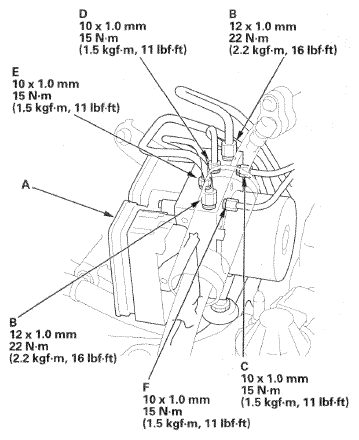 Courtesy of AMERICAN HONDA MOTOR CO., INC.
- Bleed the brake system (see
BRAKE SYSTEM BLEEDING
).
- Do the VSA sensor neutral position memorization procedure (see VSA SENSOR NEUTRAL POSITION MEMORIZATION
).
- Start the engine, and check that the VSA indicators go off.
- Test-drive the vehicle, and make sure that the VSA indicators do not come on.
NOTE:
If the brake pedal is spongy, there may be air trapped in the modulator which could then be induced into the normal brake system during modulation. Bleed the brake system again (see
BRAKE SYSTEM BLEEDING
).