Operation Procedure
- Turn ignition switch to ACC or ON.
- Wait for the Bluetooth® system to complete initialization. This may take up to 20 seconds.
- Press and hold the steering wheel audio control switch (PHONE/SEND) button for at least 5 seconds. The Bluetooth® system will begin to play a verbal prompt.
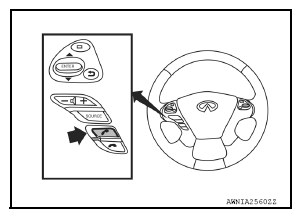 Courtesy of NISSAN NORTH AMERICA, INC.
- While the prompt is playing, press and hold the steering wheel audio control switch (PHONE/END) button until you hear the "Diagnostics mode" prompt. The Bluetooth® system will sound a 5-second beep.
- While the beep is sounding, press and hold the steering wheel audio control switch (PHONE/END) button again until you hear prompts.
- The Bluetooth® system has now entered into the diagnostic mode. Results of the diagnostic checks will be verbalized to the technician. Refer to
"WORK FLOW ".
- After the failure records are reported, an interactive microphone test will be performed. Follow the voice prompt. If the microphone test fails, refer to
"WORK FLOW ".
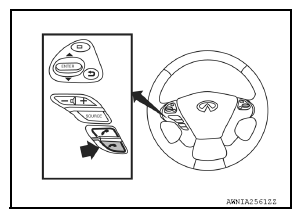 Courtesy of NISSAN NORTH AMERICA, INC.