ID Registration With Transmitter Activation Tool
- With the ignition switch in OFF position, connect CONSULT-III to the Data Link Connector (DLC).
- Turn ignition switch to ON position.
- Display the "WORK SUPPORT" (in Air Pressure Monitor) and select "ID REGIST". Select "START " on the "ID REGIST" screen.
- Using one of the sensor activation tools:
- Transmitter Activation Tool (J-45295)
: With the J-45295 pushed against the front left air valve, press and hold the transmitter activation tool button until the indicator lamp turns OFF (approximately 5 seconds). See Fig 1. When ID registration of each wheel has been completed, the turn signal lights blink twice.
- Signal Tech II (J-50190)
: Hold the J-50190 against the side of the left front tire, near the valve stem. See Fig 1. With the tool held at a 0 to 15 degree angle to the tire, select "Activate Sensor" from the main menu, then press and release the "OK" button to activate the sensor. Once the sensor is activated, the vehicle parking lamps will flashtwice and the sensor ID will appear on the CONSULT screen.
- Repeat procedure for the remaining tires in this order: right front, right rear, left rear.
- After completing all ID registrations, press "END" on CONSULT to complete the procedure.
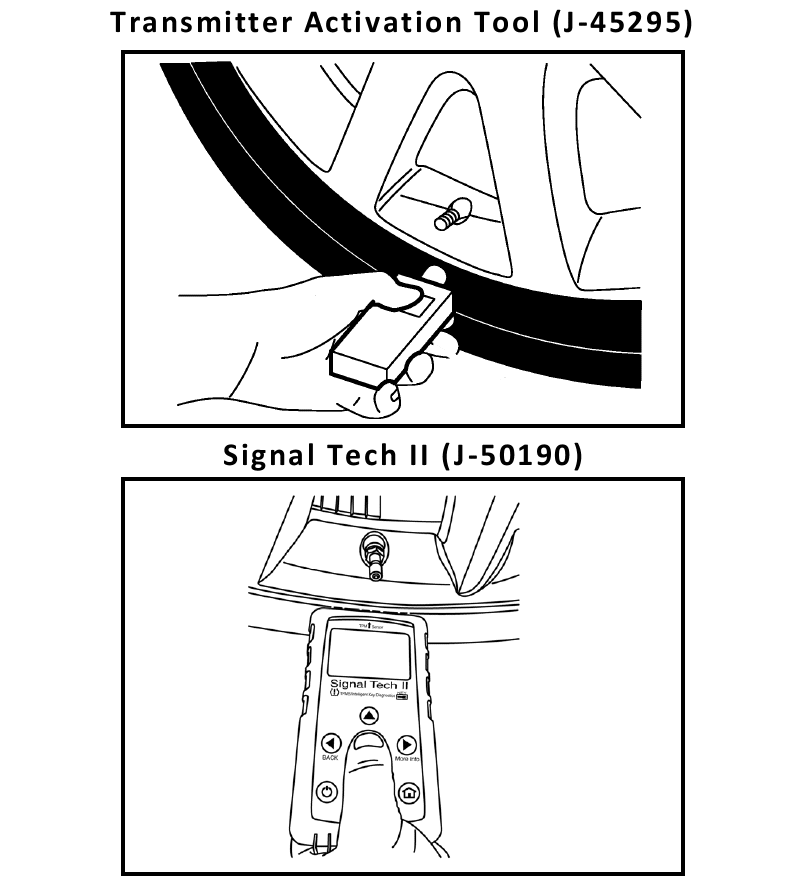 Courtesy of NISSAN MOTOR CO., U.S.A.