Using Hand-Held Tester
- Connect the hand-held tester to the DLC3 located under the left side of the instrument panel. See Fig 1. Turn the ignition switch ON and push the hand-held tester switch ON. Use scan tool to check the DTCs and freeze frame data; note them down. See tester's operator's manual for specific operating instructions. Clear DTCs. See CLEARING DIAGNOSTIC TROUBLE CODES .
- Operate system for which the complaint was recorded to see if fault can be recreated. If same DTC is displayed and fault is present, problem is current in diagnostic circuit, diagnose and repair DTC. See DIAGNOSTIC TROUBLE CODE DEFINITIONS table. If same DTC is not received and no symptoms are present, original DTC was a history code signifying that problem occurred in circuit some time in the past or is a secondary problem. If same DTC is not received, but fault is still present, problem is still occurring somewhere other than current diagnostic circuit. Diagnose and repair problem based on existing symptoms:
- If the display shows UNABLE TO CONNECT TO VEHICLE when you have connected the cable of the hand-held tester to the DLC3, turned the ignition switch ON and operated the hand-held tester, there is a problem on the vehicle side or tool side. If the communication is normal when the tool is connected to another vehicle, inspect the DLC3 of the original vehicle. If the communication is still impossible when the tool is connected to another vehicle, the problem is probably in the tool itself, so consult the Service Department listed in the tool's instruction manual.
- If the same DTC is not received and the fault is not present, the fault may have occurred in the wiring harness or connector in the past. Check connectors for loose, damaged or corroded terminals.
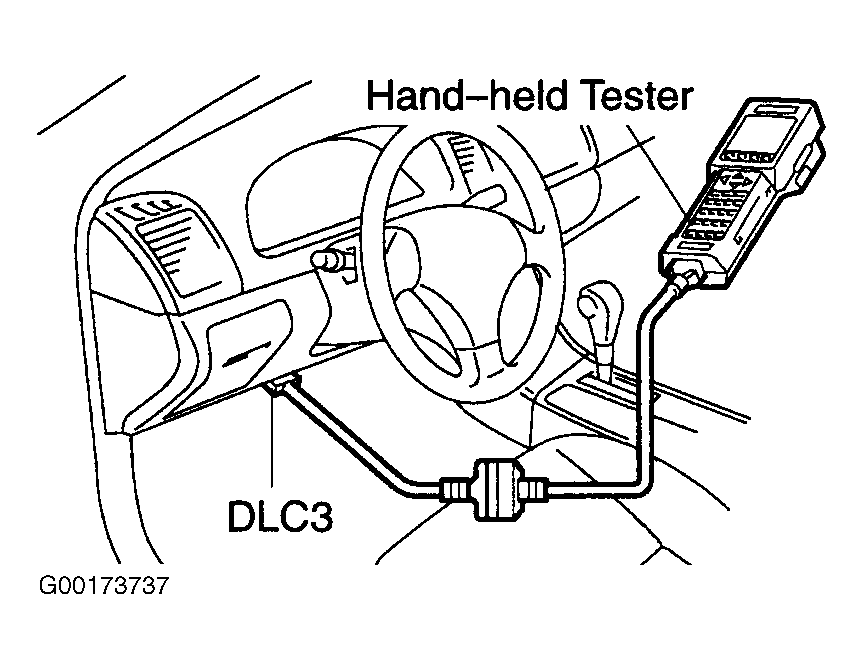 Courtesy of © TOYOTA, LICENSE AGREEMENT TMS1002