Confirmation Driving Pattern
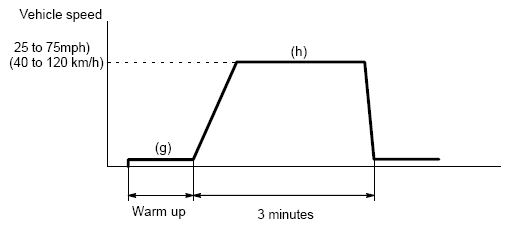 Courtesy of © TOYOTA, LICENSE AGREEMENT TMS1002
- Connect the hand-held tester to the DLC3.
- Turn the ignition switch to ON.
- Turn the hand-held tester ON.
- Clear DTCs.
- Select the following menu items: DIAGNOSIS/ENHANCED OBD II/MONITOR INFO/MONITOR RESULT.
- Check that RES RATE B1 S1 is INCOMPL.
- Start the engine and warm it up.
- Drive the vehicle at between 25 mph and 75 mph (40 km/h and 120km/h) for 3 minutes. However, the vehicle should be driven at constant speed.
- When detection is complete, response rate of MONITOR RESULT changes. If the value does not change, perform step (g) once more.
- Note the value of the Monitor Result.
- Select the following menu items: DIAGNOSIS/ENHANCED OBD II/DTC INFO/ PENDING CODES.
- Check if any DTCs (any pending DTCs) are set.