DTC Check/Clear
- CHECK DTC
- Prepare an intelligent tester and CAN VIM.
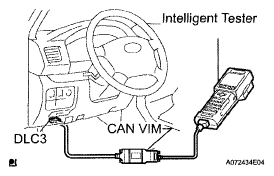 Courtesy of © TOYOTA, LICENSE AGREEMENT TMS1002
- Connect the intelligent tester (with CAN VIM) to DLC3.
- Turn the ignition switch ON and turn the intelligent tester main switch ON.
- Select the following menu items: DIAGNOSIS / ENHANCED OBD II / DTC INFO / CURRENT CODES.
- Using the intelligent tester, check DTCs and note them down (For further details, see the intelligent tester's instruction book.).
- CLEAR DTC
- Connect the intelligent tester to the DLC3.
- Turn the ignition switch ON.
- Turn the tester ON.
- Select the following menu items: DIAGNOSIS / ENHANCED OBD II / DTC INFO / CLEAR CODES.
- Press the YES button.