65 83 600 Replacing HIP Module for Car Communication Computer
65 83 600 Replacing HIP Module For Car Communication Computer

IMPORTANT: Read and comply with notes on protection against electrostatic discharge (ESD protection).

Necessary preliminary tasks:
- Remove Car Communication Computer
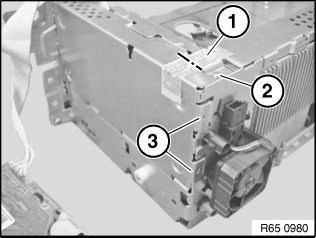
If necessary, cut through warranty seal (1).
Release screw (2).
Lift HIP module out of mounting (3) and carefully place to one side.
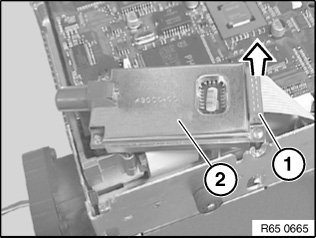
Disconnect plug connection (1) in direction of arrow and remove HIP module (2).
After installation:
- Cars with out-of-date software status at time of repair:
After replacing the HIP module, program the Car Communication Computer. Then take the car for an initialization drive.
- Cars with current software status at time of repair:
After replacing the HIP module, take the car for an initialization drive.

Initialization drive:
Drive for 15-20 minutes at 50 km/h and with good GPS reception until correct vehicle position is achieved in the navigation display.
NOTE: During this time, the position pointer of the navigation system can be motionless or move across country.