Repair Procedure
REPAIR PROCEDURE1. Check the underside of the hood to verify that there is no label previously installed to indicate that this reprogramming has already been done. If a label is present and the "ROM ID # on the label matches the "New S/W Part No." in the table at the end of this bulletin, the ECM is to the latest level and reprogramming is not necessary.
For MEDIC-II users only: (MUT-III users go to step 5)
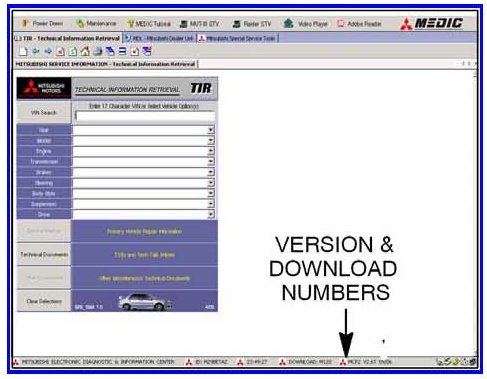
2. Verify that the MEDIC-II is at version 4.5 and at download M220 or higher.
If your MEDIC-II Download is below M220, update your MEDIC-II as follows.
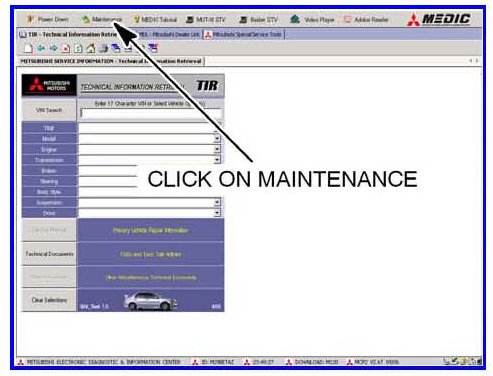
3. On the MEDIC-II main screen, click on "Maintenance".
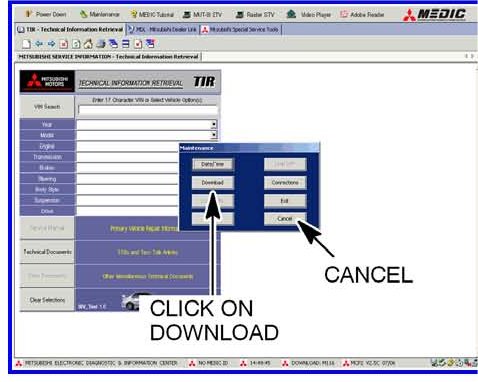
4. Click on "Download". After the download completes, click on "Cancel" to exit the "Maintenance" window.
GO TO THE REPROGRAMMING PROCEDURE.
5. Scan Tool Viewer (STV) ONLY (MEDIC-II USERS go to the Programming Procedure. Verify that your MUT-III has the most current version of the reprogramming database:
a. Select "Special Function", then select "ECU Reprogramming."
b. Select "Database File Display." The database version is displayed in the top right corner of the screen. Make sure the database version is N08051 or greater.
c. If the database version is N08051 or greater, reprogram the ECM as described in the Programming Procedure.
d. If the database version is less than N08051, you must transfer the new reprogramming data from the Reflash Update CD 05/08 to the MUT-III hard drive as follows:
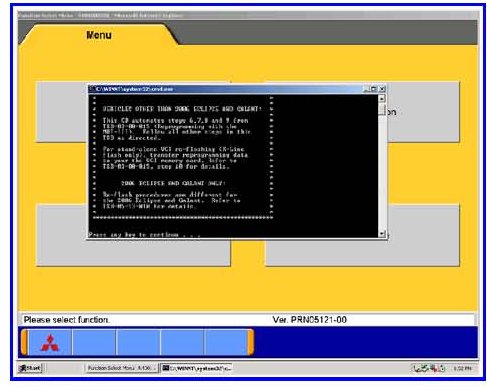
1. Install Reflash Update CD 05/08 into the PC's DVD-ROM drive.
2. Follow the instructions on the screen. The system will automatically transfer the reprogramming data onto the PC's hard drive.
3. Continue to the Reprogramming Procedure.