LEMON Manuals: Even more car manuals for everyone: 1960-2025
Home >> Mitsubishi >> 2010 >> Lancer Evolution SE >> Repair and Diagnosis >> External Pages >> Different variant/trim >> Section 109 (Multi-Media Communications System (MMCS) - Lancer Evolution) >> Diagnosis >> Service Mode >> How To Initiate The Service Mode
April 5, 2026: LEMON Manuals is launched! Read the announcement.

How To Initiate The Service Mode

WARNING: This page is about a different variant/trim than selected.
  1. With the navigation system active, press and hold both the "NAVI" and "SET" buttons for 3.5 seconds.
  2. The service mode will be initiated. Then "Service" screen will be displayed.
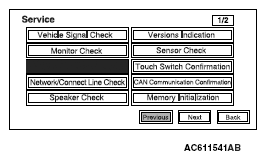
    Fig 1: Display - Service Screen
    G05385459Courtesy of MITSUBISHI MOTOR SALES OF AMERICA.