LEMON Manuals: Even more car manuals for everyone: 1960-2025
Home >> Mitsubishi >> 2013 >> Lancer Evolution MR >> Repair and Diagnosis (Single Page) >> External Pages >> Different variant/trim >> Section 1 (MITSUBISHI Multi-Communication System (MMCS) - Lancer Evolution) >> Service Mode >> How To Initiate The Service Mode
April 5, 2026: LEMON Manuals is launched! Read the announcement.

How To Initiate The Service Mode

WARNING: This page is about a different variant/trim than selected.
  1. With the navigation system active, press and hold both the "NAVI" and "SET" buttons for 3.5 seconds.
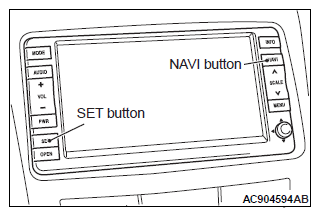
    Fig 1: NAVI & SET Buttons
    G07034904Courtesy of MITSUBISHI MOTOR SALES OF AMERICA.
  2. The service mode will be initiated. Then "Service" screen will be displayed.