Service Data Log
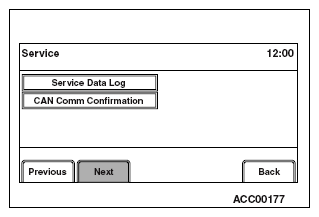
- Select "Service Data Log" button on "Service" screen.
 Courtesy of MITSUBISHI MOTOR SALES OF AMERICA.
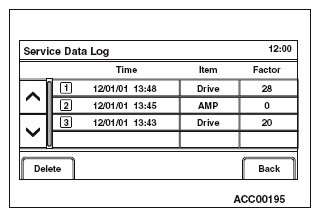
- The error log, which is stored during a system failure (drive failure), will be displayed.
NOTE:
- Up to ten error logs can be stored.
- The error logs in the list are sorted in descending order from new to old.
- When you select "Delete" button, all of the stored error logs will be erased.
 Courtesy of MITSUBISHI MOTOR SALES OF AMERICA.
EACH LOG INFORMATION: FACTOR CODE TABLE
| Item |
Factor number |
Produced log |
| Drive |
20 |
Log concerning focus |
| 21 |
Log concerning disc type |
| 22 |
Log concerning disc |
| 25 |
Log concerning SEEK |
| 26 |
Log concerning servo start-up |
| 27 |
Log concerning power-On |
| 28 |
Log concerning loading/eject operation |
| 29 |
Log concerning pick-up operation |
| 30 |
Log concerning state of mechanism |
| 52 |
Log concerning TOC reading |
| HDD |
1 |
Log concerning high temperature |
| 2 |
Log concerning low temperature |
| Monitor |
1 |
Log concerning high temperature |
| AMP |
0 |
Log concerning connection |
| 15 |
Log concerning communication |
| SP |
1, 2, 8, 15 |
Log concerning number of speakers unexpected |
| CAR |
0-12, 130, 131, 160, 192, 255 |
Log concerning vehicle model unexpected |