Installing Multimedia Interface
- Plug in electric plug connections for the multimedia interface.
- 1.1. Insert jack socket -D-
into the mounting until the jack socket locks into place.
- 1.2. Insert USB interface -C-
into the mounting until the USB interface locks into place.
- 1.3. Connect plug connection for 12 V supply -B-
until the connector engages securely.
- 1.4. Secure the line with a tie-wrap -A-
.
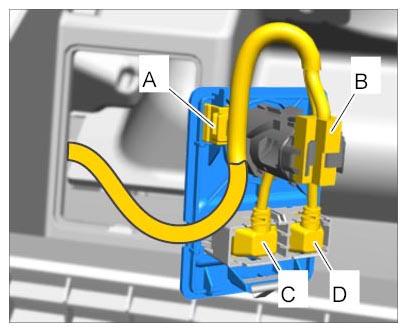 Courtesy of PORSCHE CARS NORTH AMERICA, INC.
- Press multimedia interface into the trim panel on the glove compartment and check that it is seated securely.