September 30: LEMON manuals is back up on a temporary server! Slowness is possible
Software Reinstall (Lead Acid Battery)
- Remove the rear underhood apron. See Underhood Apron - Rear (Remove And Replace)
.
- Connect an LV battery maintainer to make sure power is not lost during the software reinstall.
CAUTION:
If using a 50A or 80A maintainer, make sure the maintainer is set to "Lead Acid" or "Half Power" mode. Failure to do so could damage the LV battery.
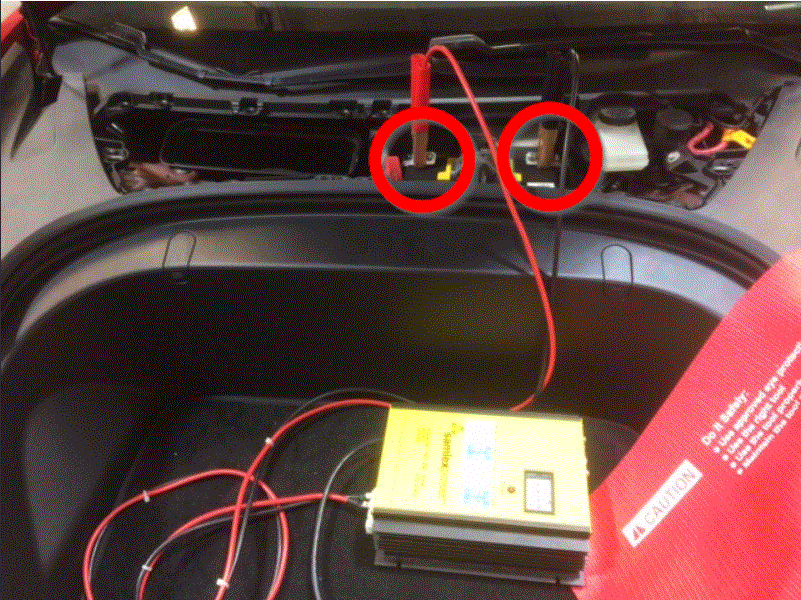 Courtesy of TESLA, INC. Courtesy of TESLA, INC.
|
- Enable Service Mode. See Service Mode .
- Go to the Service Mode menu: touch the Service Mode "wrench" icon at the bottom of the vehicle touchscreen.
NOTE:
Alternatively, for vehicles with older firmware versions: Touch Controls
(vehicle icon), and then touch Service Mode
.
- On the vehicle touchscreen, touch Software Reinstall > Reinstall
.
- Once the reinstallation is complete, check that the release notes appear on the touchscreen, indicating a successful reinstallation.
- Disconnect the LV maintainer.
Courtesy of TESLA, INC.
|
- Disable Service Mode. See SERVICE MODE .
- Install the rear underhood apron. See Underhood Apron - Rear (Remove And Replace)
.