Starting Procedure
- Start the engine.
- Turn the audio system OFF.
- While pressing the "SETTING" button, turn the volume control dial clockwise or counterclockwise for 40 clicks or more. (When the self-diagnosis mode starts, a short beep will sound.)
- Shifting from the current screen to the previous screen is performed by pressing the "BACK" button.
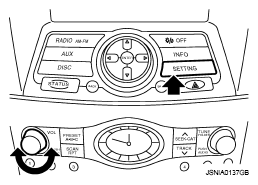 Courtesy of NISSAN MOTOR CO., U.S.A.
- The trouble diagnosis initial screen is displayed, and then the items of "Self Diagnosis" and "Confirmation/Adjustment" can be selected.
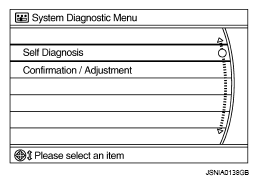 Courtesy of NISSAN MOTOR CO., U.S.A.