September 30: LEMON manuals is back up on a temporary server! Slowness is possible
System Operation Check Mode: Operation: Notes
- Prepare the Subaru Select Monitor kit. Ref. to
PREPARATION TOOL , General Description.
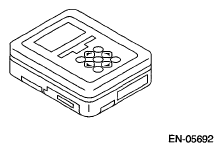 Courtesy of SUBARU OF AMERICA, INC.
- Prepare PC with Subaru Select Monitor installed.
- Connect the SDI (Subaru Diagnostic Interface) to the PC USB port (exclusively for Subaru Select Monitor) using a USB cable.
NOTE:
The dedicated port for the Subaru Select Monitor means the USB port which was used to install the Subaru Select Monitor.
- Connect the diagnosis cable to SDI.
- Connect the SDI to data link connector located in the lower portion of the instrument panel (on the driver's side).
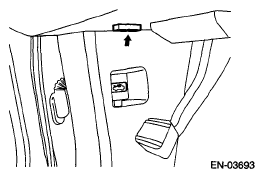 Courtesy of SUBARU OF AMERICA, INC.
CAUTION:
Do not connect the scan tools except for Subaru Select Monitor and general scan tool.
- Start up the PC.
- Turn the ignition switch to ON (engine OFF), and run the "Application for Subaru Select Monitor".
- On the «Main Menu», select {Each System Check}.
- On the «System Selection Menu», select {Engine Control System}.
- Click the [OK] key after the information regarding engine type has been displayed.
- Select {System Operation Check Mode} on the «Engine Diagnosis» display screen.
- The following items are displayed on the monitor.
OPERATION CHART
| Display |
| Actuator ON/OFF Operation |
| Immobilizer System |
| Fuel Pump Control |
| Fixed Idle Ignition Timing |
| Idle Speed Control |
| Injector Control |
| EGR Valve Control |